Step 6 of 7
Your Profile & Loyalty
Open Your Profile
Click your Profile Icon (top-right) → My Profile to manage your account.
Update Your Info
Edit your First Name, Last Name, Phone, and Address. Your email is read-only and shown with a verified badge.
Upload a Photo
Tap your avatar to upload a new profile picture. The image is saved securely to your account.
Verify Your Phone
Tap Send OTP, enter the 6-digit code sent to your phone, and confirm. This adds security and enables SMS notifications.
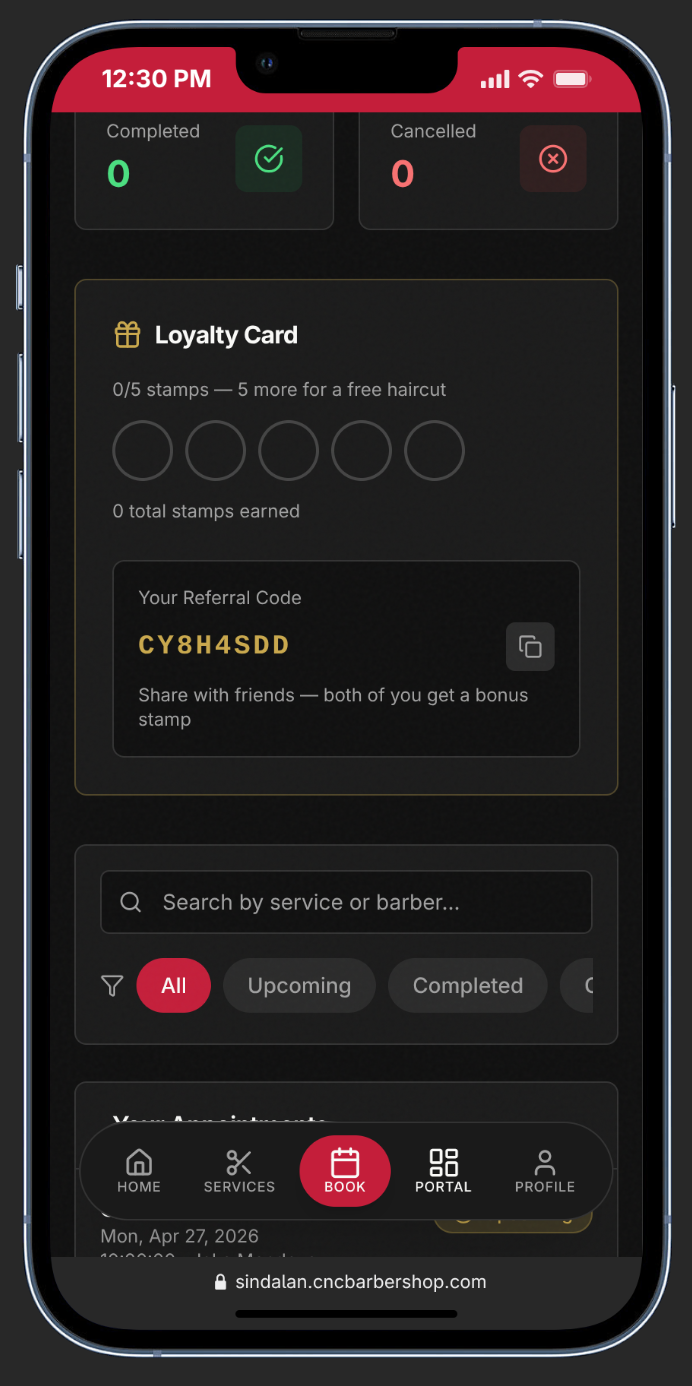
Check Your Loyalty Card
In the Customer Portal, view your Loyalty Card. Earn 1 stamp per completed visit. Collect 5 stamps for a FREE haircut!
Share Your Referral Code
Copy your unique referral code and send it to friends. When they sign up with your code, both of you earn a bonus stamp.
Your referral code is unique to you. Every friend who uses it gets both of you closer to a free cut — share it everywhere!